What are data models?
This guide is aimed at data modelers, data managers and other data users to facilitate collaboration with developers in designing Zendro-generated database systems. We assume that, as a data modeler or manager, you might be responsible for structuring your database and work with a developer or system administrator to set up the project.
Table of contents
Zendro takes as input a set of data models described in JSON files, from which it automatically generates both the backend and the GUI of a custom data warehouse. To get started, you need a conceptual model or schema of your database, including entities, attributes and their relationships. Each data model — that is, each entity with its corresponding attributes and associations to other entities — must be defined as a JSON object in a separate file, according to the JSON specification. Zendro supports the standard associations One-to-One, One-to-Many, and Many-to-Many between data models stored either locally or remotely, described in detail in Associations. But first, let’s introduce an example that will help illustrate the requirements throughout this guide.
An example
Let’s assume we want to create a small database for a herbarium of medicinal plants. We need data models for specimens, taxonomic information, collection information, and uses (Figure 1). In our case, the taxonomic information is specific to each plant, so there is a One-to-One association between specimen and taxon. Each plant can have many uses, just like there are many plants that can serve the same function, so the association between specimen and uses is Many-to-Many. Finally, a specimen belongs to only one collection, but a collection may store multiple specimens, so there is a One-to-Many association between these models (Figure 1).
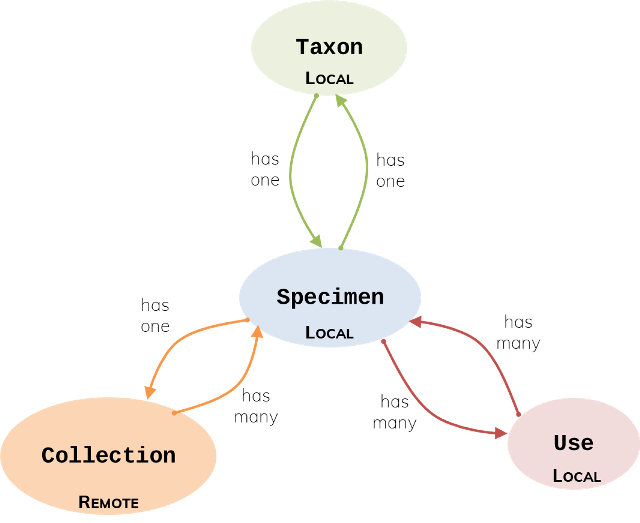
In this example, information about specimens, taxonomic data and uses is stored on a local server. But let’s assume that the information about collections is in a remote database, perhaps one that holds other types of plants, and we would connect to that database to access only the attributes we are interested in.
Next, we need to list the attributes of each model and their data types (Figure 2). Allowed data types are: String, Int, Float, Boolean, Date, Time and DateTime. Each model also requires an attribute that serves as the primary key, or unique identifier, of each record.
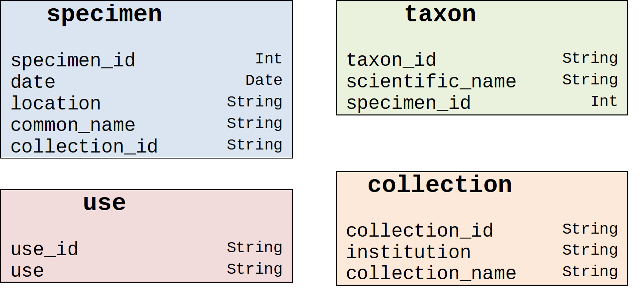
Foreign keys are also needed to establish associations to other data models; their location depends on the association type. Note that in Many-to-Many associations, it is necessary to define an additional model for the cross table of foreign-key pairs that define the association. For more details, please read the documentation on associations in Sequelize, on which Zendro is based.
From conceptual model to JSON
To translate the conceptual diagram into JSON, follow the JSON specification. Two complete examples:
// Taxon Model
{
    "model": "taxon",

    "storageType": "sql",

    "attributes": {
        "taxon_id": "String",
        "scientific_name": "String",
        "specimen_id": "Int"
    },

    "associations": {
        "specimen_information": { // give your association an informative name
            "type" : "one_to_one",
            "implementation": "foreignkeys",
            "reverseAssociation": "taxon_information", // The name of the reverse association defined in the specimen model
            "target": "specimen",
            "targetKey": "specimen_id",
            "keyIn": "taxon",
            "targetStorageType": "sql",
            "label": "common_name",
        },
    },

    "internalId": "taxon_id"
}
// Collection Model
{
    "model": "collection",

    "storageType": "generic",

    "attributes": {
        "collection_id": "String",
        "institution": "String",
        "collection_name": "String"
    },

    "associations": {
        "medicinal_plants": {
            "type" : "one_to_many",
            "implementation": "foreignkeys",
            "reverseAssociation": "collection",
            "target": "specimen",
            "targetKey": "specimen_id",
            "keyIn": "specimen",
            "targetStorageType": "sql",
            "label": "common_name",
            "sublabel": "date"
        },
    },

    "internalId": "collection_id"
}
Associations can get more involved than this simple example — see Associations for single-end and paired-end foreign keys, many-to-many cross tables, and generic associations.
Next steps
- JSON specification — the full reference for model attributes, supported data types and top-level fields.
- Associations — how to connect data models to each other.
- Data validation — custom validation rules for your attributes.
- Cassandra storage type — restrictions specific to Cassandra-backed models.
- How to import and export data — once your models are generated, this is how you get data in and out of Zendro.